Maintenance & inspection software for property managers

Track every repair, with photo proof.

Log the issue, assign the contractor, and get photos of the finished work — across every door you manage. Maintenance, inspections, tenants, and leasing in one place.

Become a founding customer See the product
Set up in an afternoon — no consultants, no import project. 14-day pilot before the first charge.
app.rq200.com
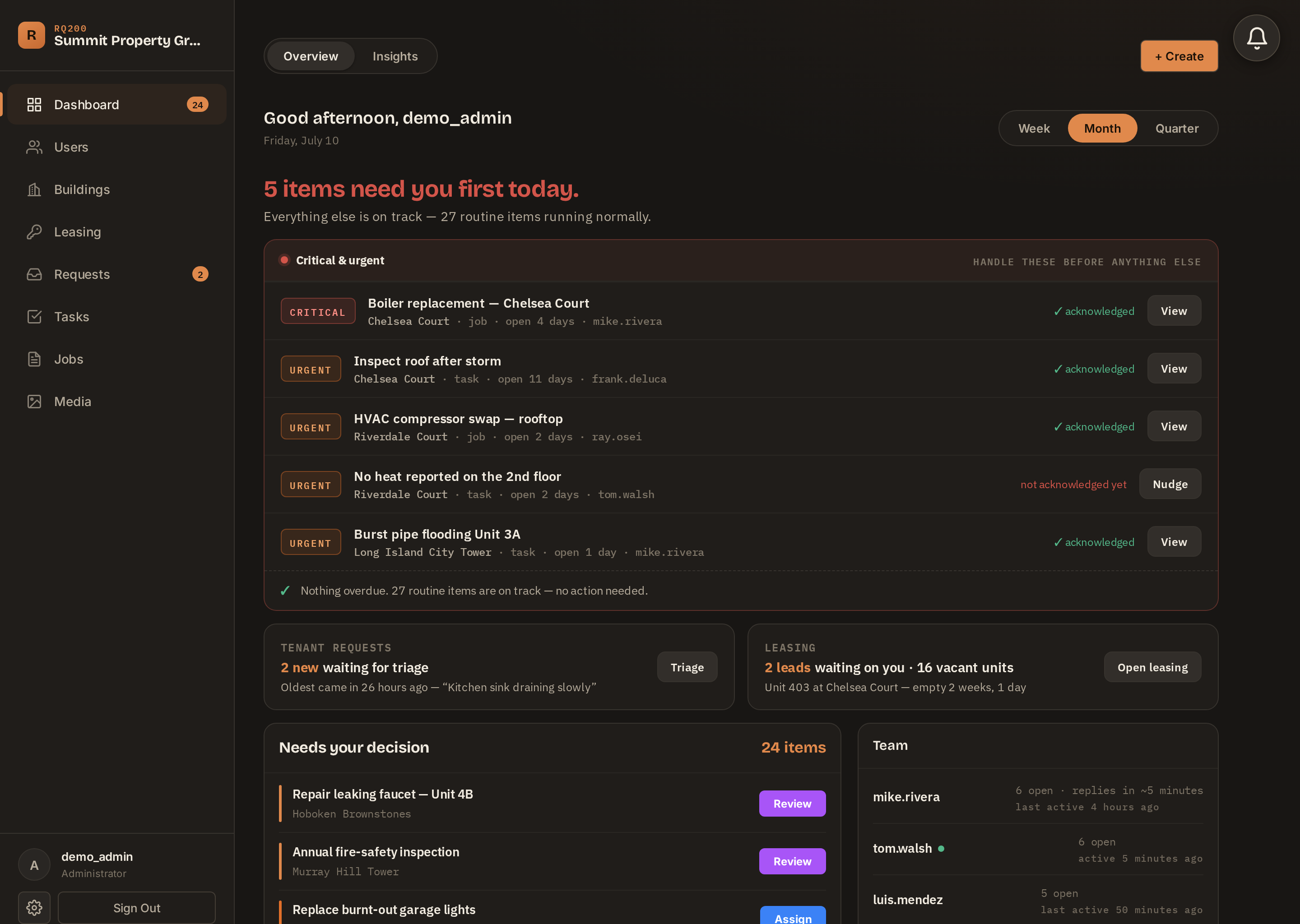
RQ200 dashboard — open work, decision queue, and team at a glance
Photo & video proof on every job Recurring maintenance runs itself Whole portfolio on one map Tenants report issues in 30 seconds
The part of the job everyone hates

You know this thread. You're in three of them right now.

Chasing one repair across texts, calls, and email — for days. And at the end, still no photo.

✗  The chase
M
Mike — Plumbing
mobile
Monday
Hey Mike — 4B is reporting the ceiling leak again. Can you get in there this week?
8:12 AM
On the Maplewood job until Thursday. Can stop by after
1:47 PM
Thursday
Following up on 4B — were you able to get in today?
4:41 PM
Friday
Went yesterday, it's all set
7:52 AM
Thanks. What did it turn out to be? And can you send me a photo of it for the file?
8:00 AM
Read 8:04 AM
The photo never comes.
Invoice #2231 — Plumbing repair — $480, work performed…Mon
RE: RE: RE: Unit 4B ceiling — “see attached” — no attachment…14 emails
Voicemail — “it's about the leak at Walnut, call me back—”0:47
✓  The same repair in RQ200 — the actual screen
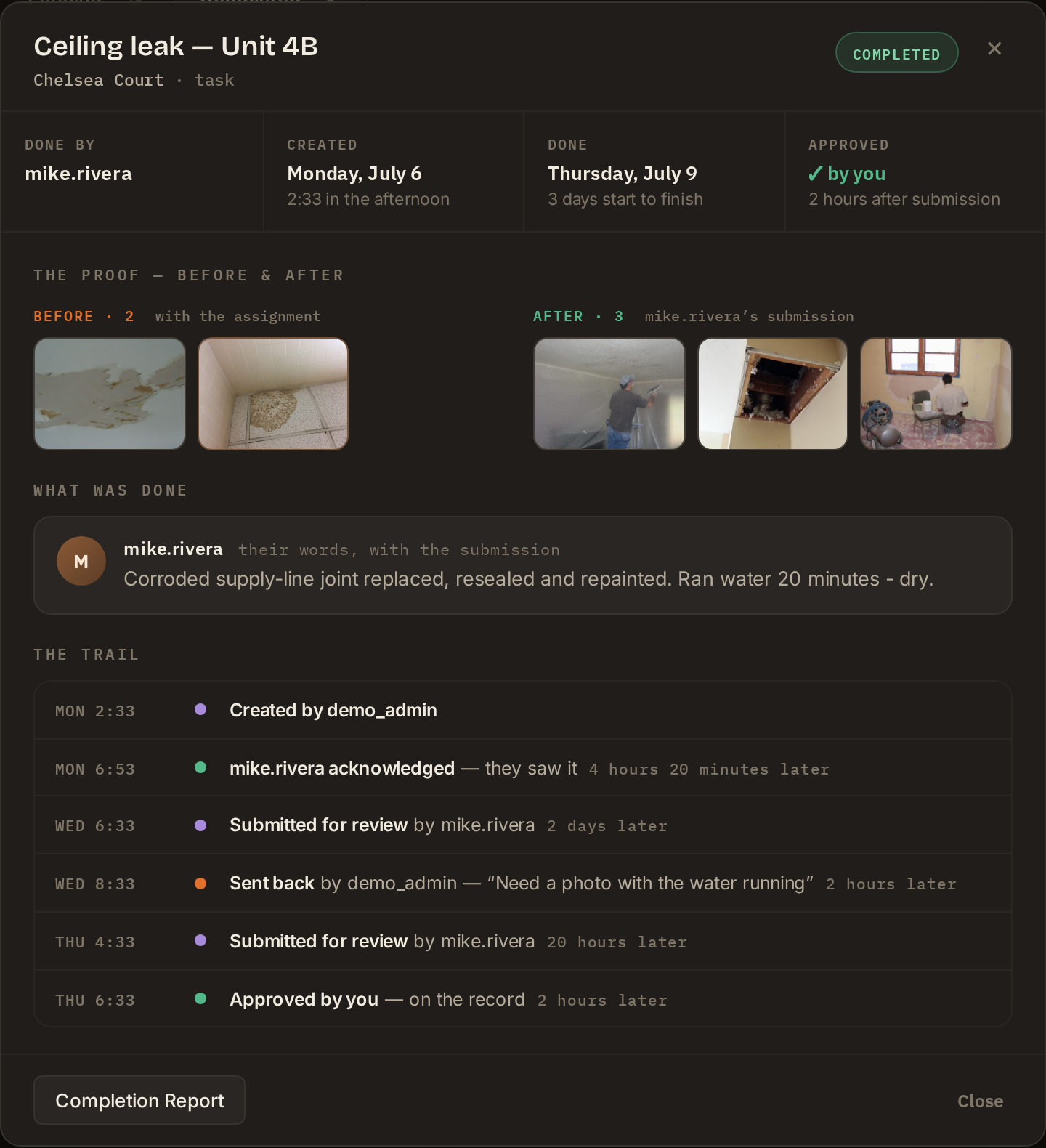
RQ200 completion record — before and after photos, the contractor's note, and the full trail from report to approval

The chase, the photos, the paper trail — that's RQ200's job. You assign it and approve it. Everything in between documents itself.

You didn't show me how you're enhancing my return.

The sentence owners say when they fire a property manager. Not "you did bad work" — "I couldn't see the work."

Keeping doors is growth

Owners don't leave over repairs.
They leave over silence.

Every job in RQ200 ends as a record an owner can see — what happened, who fixed it, photo proof, and what it cost. When an owner asks what they're paying you for, you show them instead of telling them.

  • Proof on every job — the answer is always one tap away
  • Fast fixes tenants notice — happy tenants write the Google reviews that grow your book
  • One record for your whole team — your coordinator sees the same screen you do, wherever they work
How it works

Request to proof, in three steps.

STEP 1

Log it in seconds

A tenant reports it, or you create it — task or job, any building. Assign a contractor with one tap. They're notified instantly.

STEP 2

Work gets done — on their phone

Your contractor sees exactly what and where. When it's done, they attach photos and video and submit. No training, no laptop.

STEP 3

You approve it

Review the work and sign off. It's on the record — the answer to “did that get done?”, months or years later.

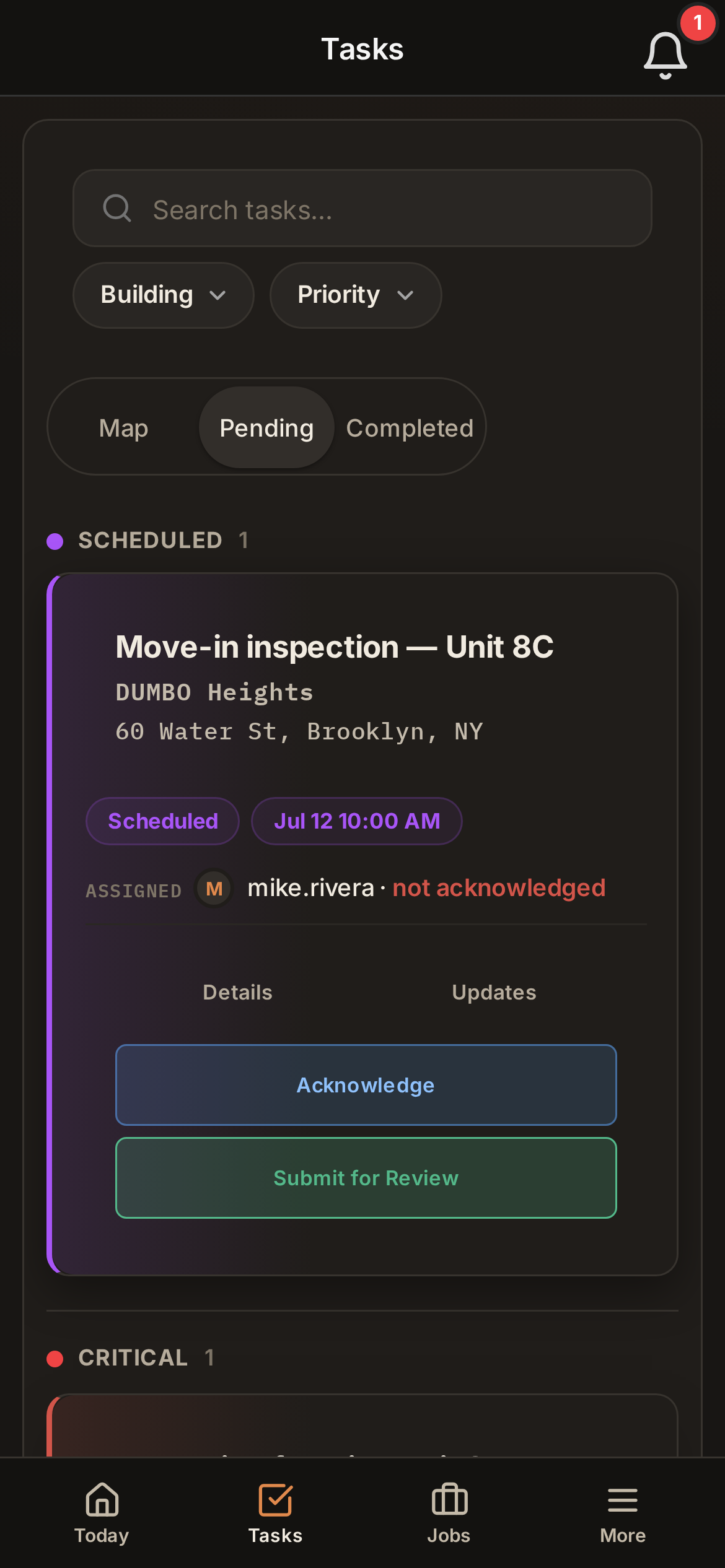
RQ200 on a contractor's phone — the assigned job with Acknowledge and Submit for Review buttons
Your crew's entire experience

If they can text, they can use it.

This is everything your contractor ever sees: the job, the building, and two buttons. Acknowledge — so you know they saw it without asking. Submit for review — with the photos attached, when the work is done.

  • No app store — runs in the browser they already have, and installs to their home screen like an app
  • Notifications that reach them — push, email, and an in-app bell, so assigned work never sits unseen
  • No training — most contractors do their first job in under five minutes
  • No “did you get my text?” — every assignment tracks whether it was seen
  • No squinting — built-in accessibility settings: larger text, higher contrast
The actual product

Real screens from the live app.

No mockups — this is what you'd log into tomorrow.

Maintenance

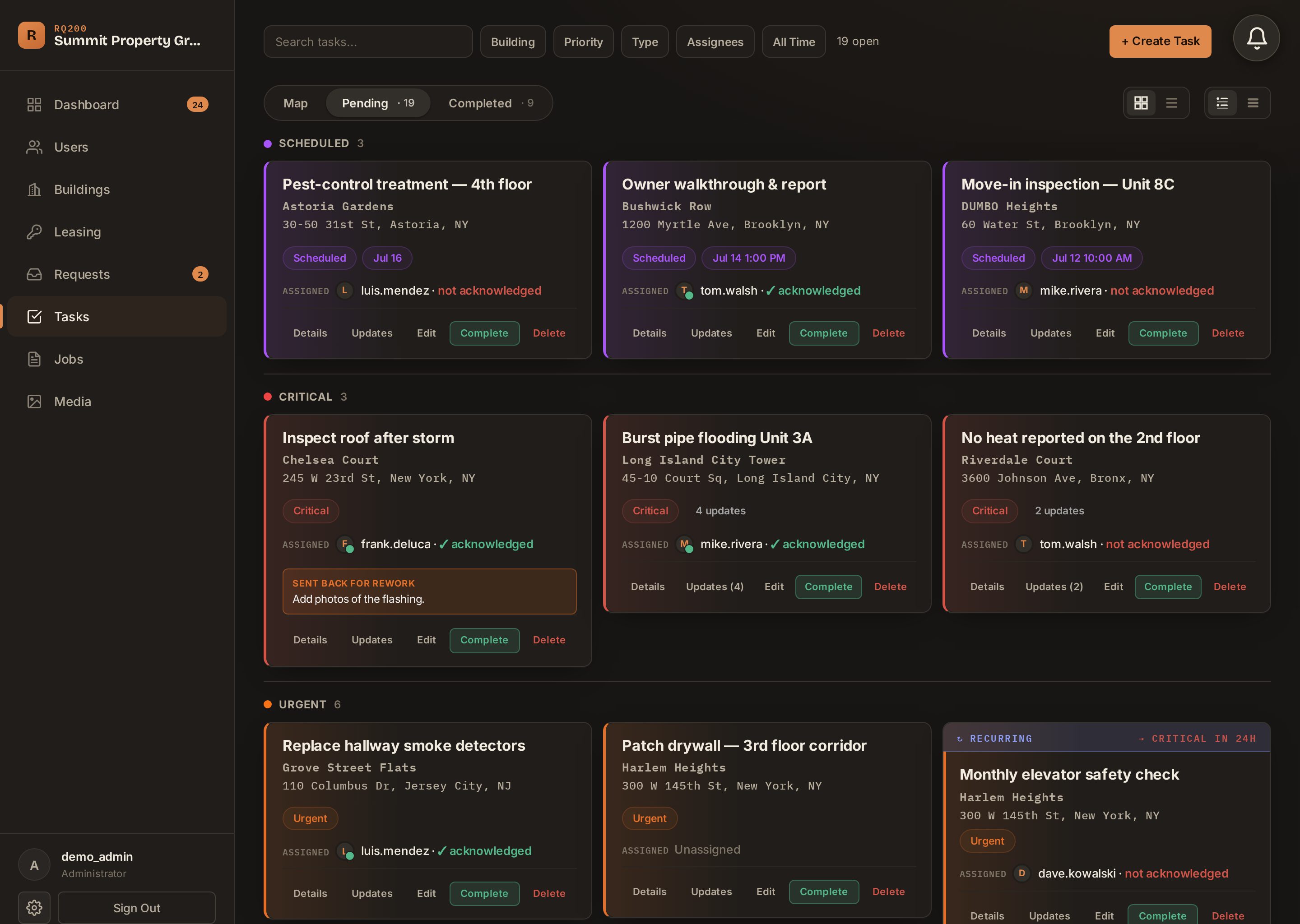
Every job, by priority — critical first.

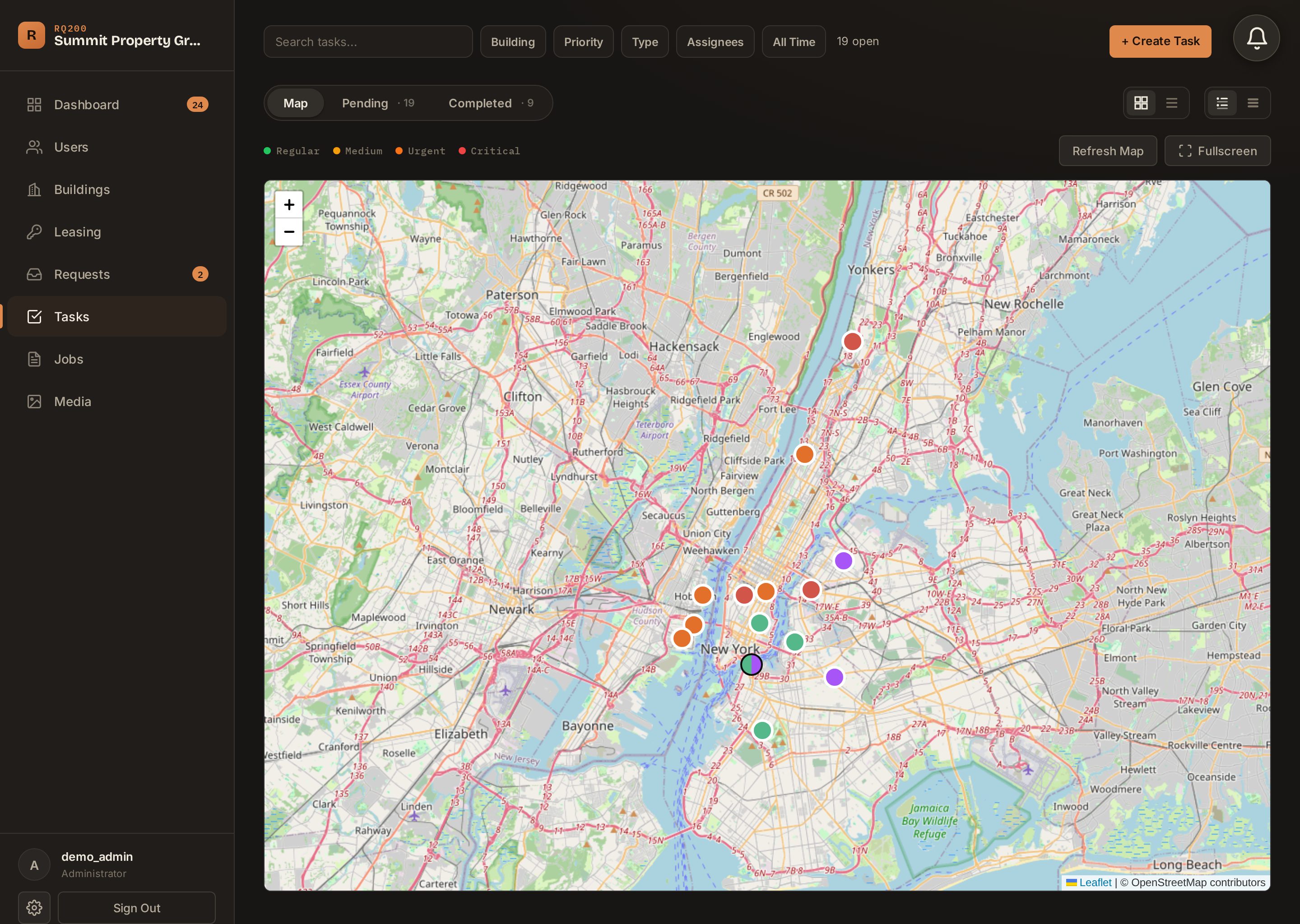
Recurring maintenance, one-off repairs, and emergencies — separated by what actually needs you, with acknowledgment tracking so you know your contractor saw it.

RQ200 task board grouped by priority with acknowledgment status
Portfolio

Your whole book, on one map.

Every building, color-coded by status. See where the problems are before the phone rings.

RQ200 map view — buildings color-coded by priority across a metro
Buildings

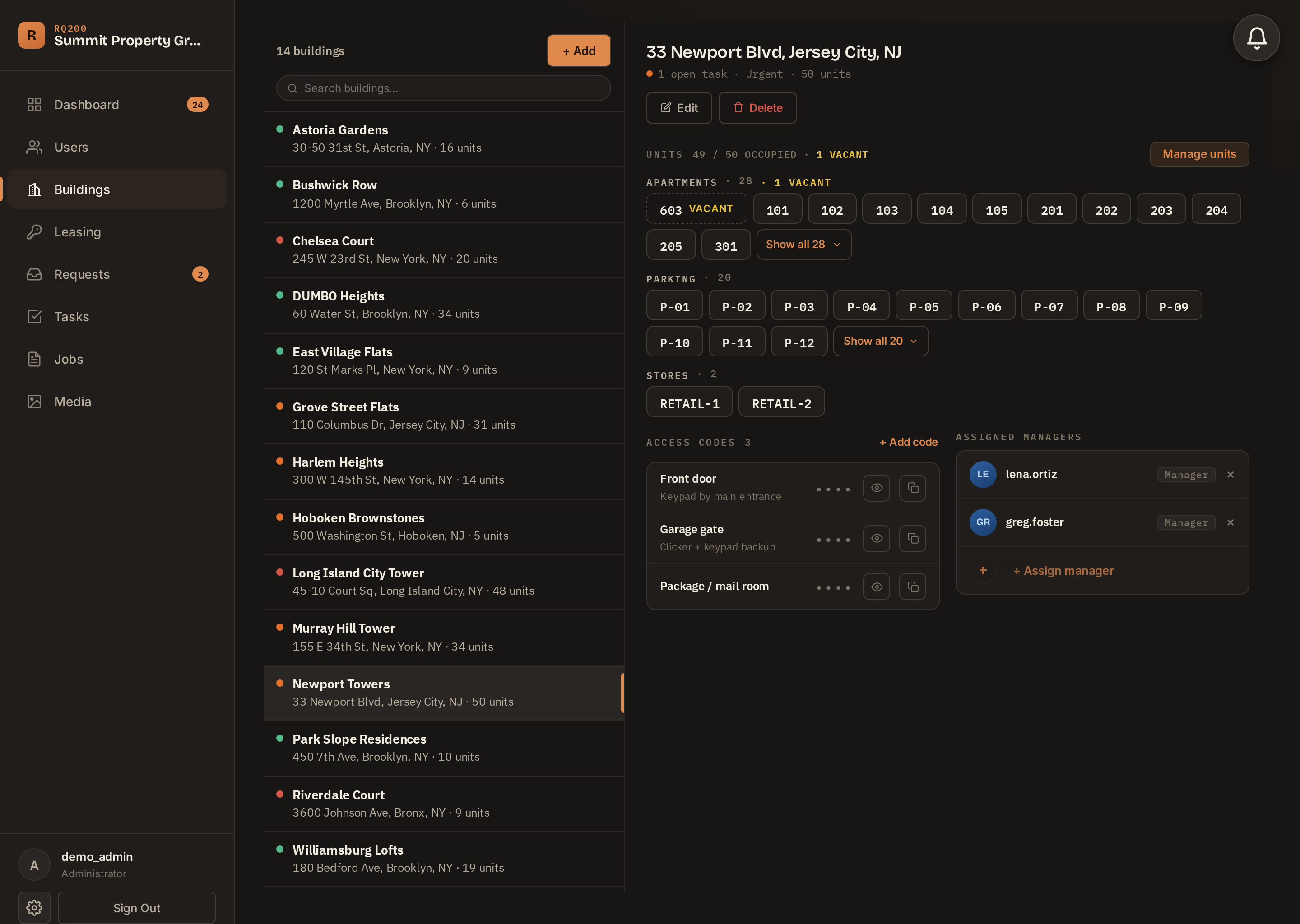
Units, tenants, access codes — one place.

Apartments, parking, retail. Who's in them, what they pay, and the door codes your contractors always ask for — encrypted, never lost in a text thread.

RQ200 building record — units, occupancy, access codes, managers

The other side of the job is in here too.

Filling units, taking tenant requests, and knowing how your operation is actually running.

Leasing

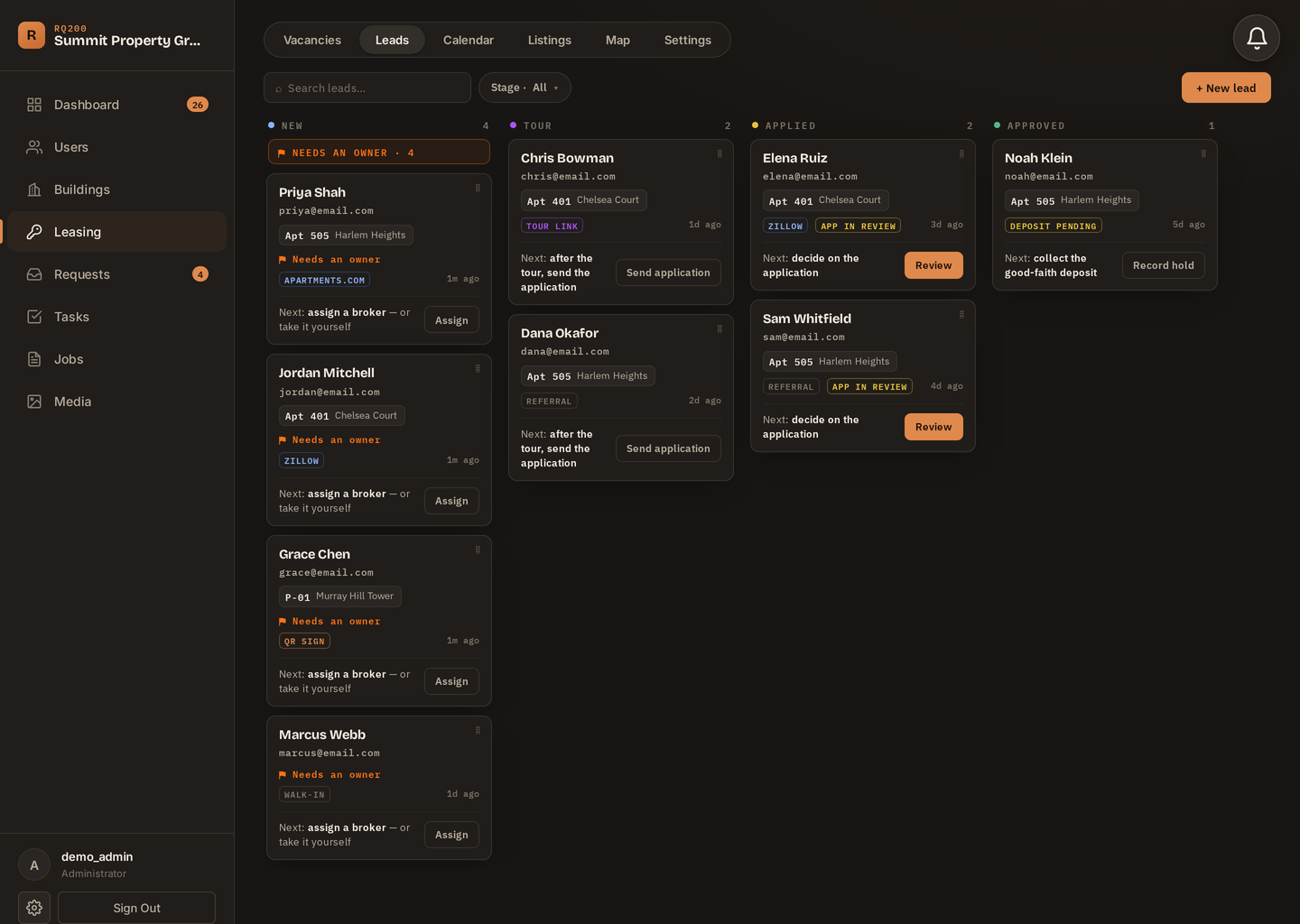
Every lead, from first contact to signed lease.

A lead board that keeps every applicant moving — calls, tours, applications — with vacancies and the rent they're costing you tracked beside it. What's a vacant unit costing you? Try the free calculator →

RQ200 leasing — the lead board with applicants moving from new to applied
Requests

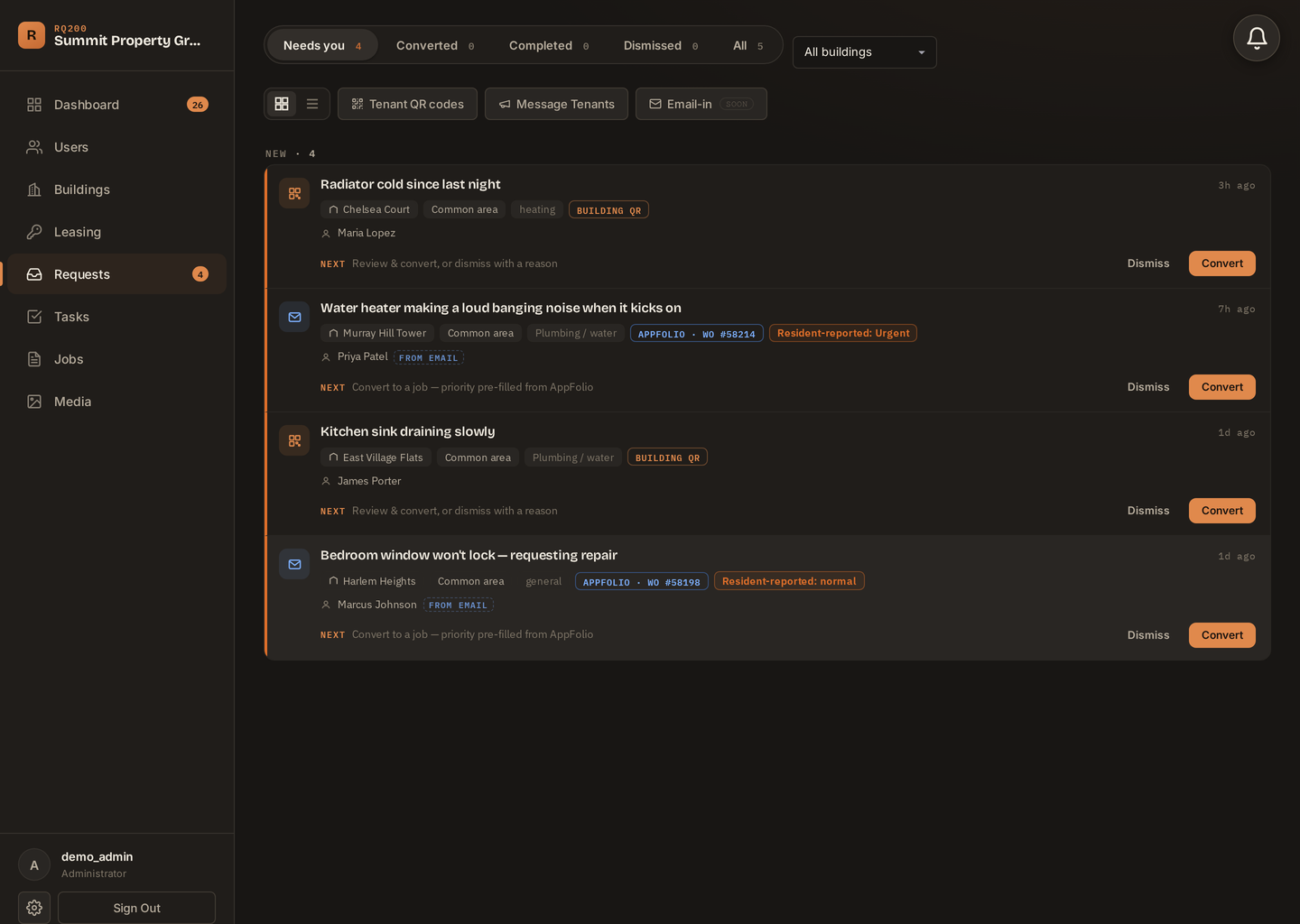
Tenant requests file themselves.

Tenants scan a QR code and report in 30 seconds. On AppFolio? Its maintenance emails land in the same inbox automatically — work-order number and priority included.

RQ200 tenant request inbox — QR-code requests and AppFolio work orders side by side
Insights

Know how the operation is actually running.

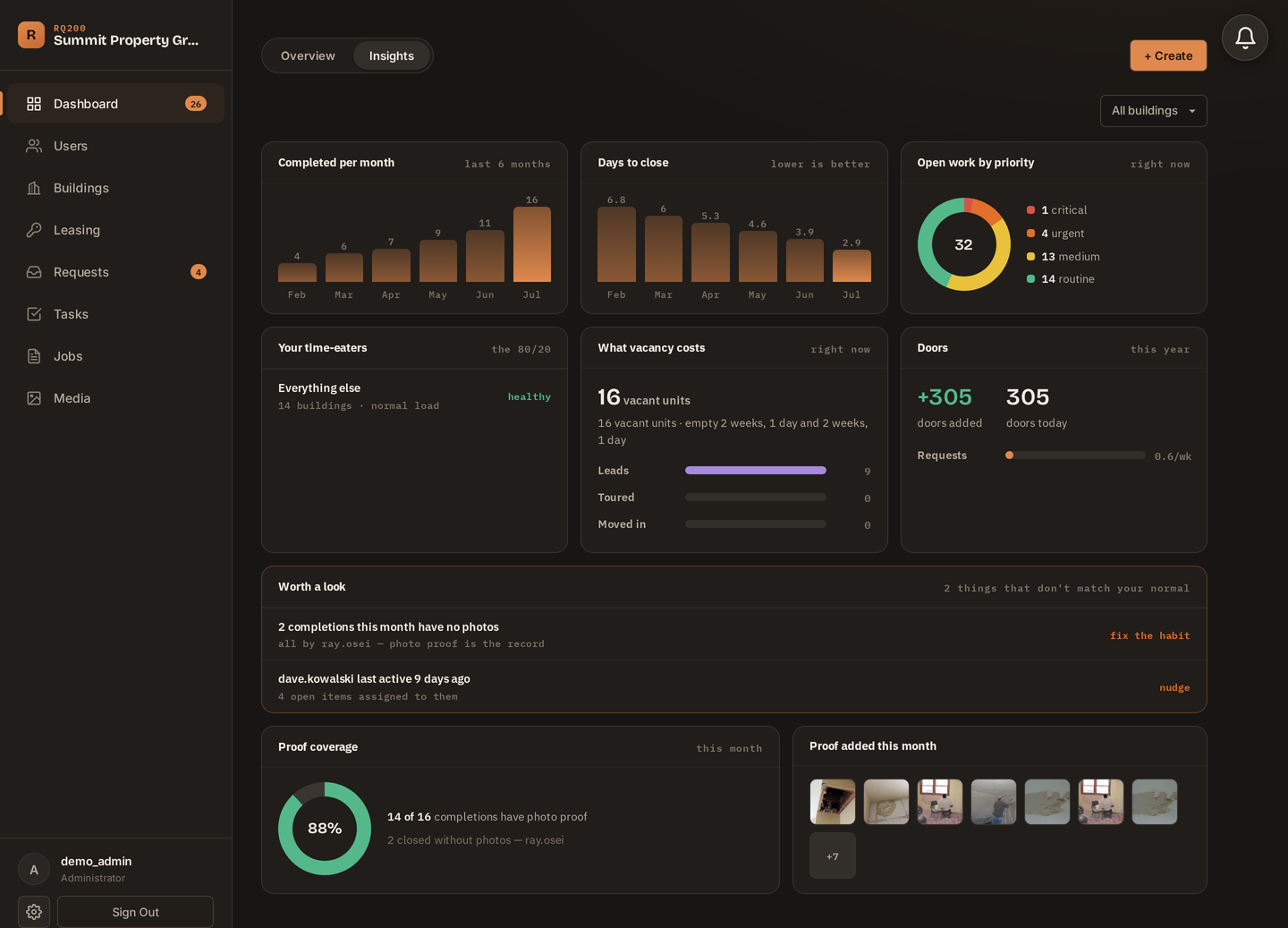
Completions per month, days-to-close, open work by priority — and a “worth a look” list that flags what's slipping before an owner notices.

RQ200 insights — six months of completions, close times, and photo-proof coverage
Founding customers · limited to 10

One flat price, locked forever.

2 of 10 spots taken

Built for operators from your first 50 doors to your first 500. Priced so saying yes is easy — one missed repair costs more than a year of RQ200 — and locked forever for founding customers.

$149 /month · whole company
Unlimited buildings, jobs, users & photo storage — no per-seat fees.
  • 14-day pilot on your real buildings — card up front, nothing billed until day 14, cancel with one email
  • Founding price locked — $149/mo for as long as you stay
  • The founder on call — you talk to the person who built it, not a support queue
  • You shape what gets built — founding customers are design partners: the feature your operation needs goes on the roadmap, and you'll see it ship
Claim a founding spot
Or just email info@rq200.com — it goes straight to the founder.
How the pilot works — no surprises
DAY 0
Card down, quick setup
Add your buildings & units, invite your team — about an afternoon
DAY 1–14
You run real work
Tasks, jobs & proof on your actual buildings — nothing billed yet
DAY 14
Keep it or cancel
One email cancels before the first charge. Staying? It just keeps running.
Where RQ200 fits

Keep whatever runs your books.

What you need
A full PM suite
RQ200
Rent, leases & accounting
✓ Built for it
— Not our job, by design
Field work & contractor coordination
Work orders exist, buried in menus
✓ The whole product
Photo/video proof on every job
✓ On every single job
Recurring maintenance that runs itself
Manual re-entry
✓ Automatic
Contractors actually use it
Licenses & training
✓ Phone-first, zero training
The honest version: if you need accounting, screening, or rent collection, keep the software you have. RQ200 runs the day-to-day work beside it — that's the part it was built for.
Questions

Asked by every property manager we talk to.

Does RQ200 replace my property-management software?
No — and it's not trying to. Whatever runs your rent and books keeps doing that. RQ200 runs the field work: maintenance, inspections, contractors, and proof. They work side by side. On AppFolio? Its maintenance emails can flow straight into RQ200's request inbox — no double entry.
My contractors aren't tech people. Will they use it?
That's who it's built for. They get a simple phone view: see the job, do the work, attach photos, submit. Most contractors are working in under five minutes, with zero training.
How long does setup take?
About an afternoon, and it's yours to do: add your buildings and units, enter your tenants, and invite your managers, contractors, and brokers. There's nothing to migrate and no import project — and if you get stuck, the founder is one email away.
What does it cost?
$149/month, flat, for your whole company — unlimited buildings, jobs, users, and photo storage. No per-seat pricing, no surprise tiers.
What happens to my records if I leave?
They're yours. Export your work history and media any time. We keep customers with a product that's useful, not with lock-in games.

Claim a founding spot

Tell us where you operate — we reply the same day, usually within the hour.

2 of 10 founding spots taken · 14-day pilot before the first charge